Machine VisionOct 11, 2026
Industrial PC for Machine Vision: How to Choose One
What sets an industrial PC apart from an office one, when a GPU or a Jetson module makes sense, what happens to heat inside a closed enclosure and what to ask before you buy.
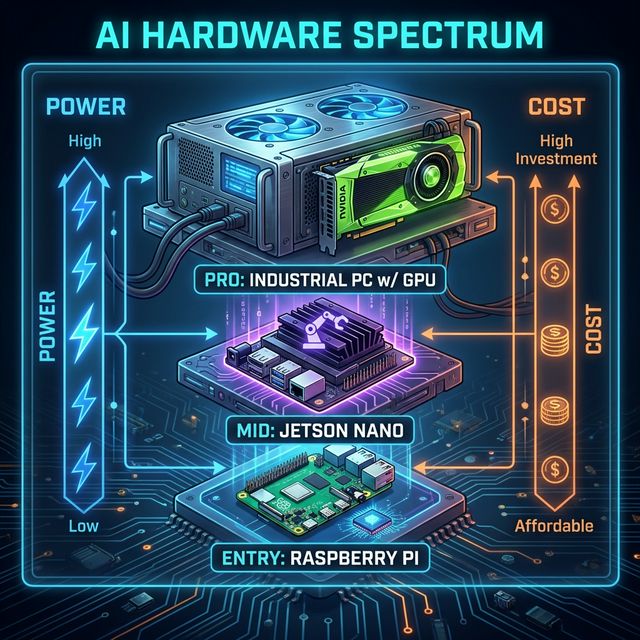
For machine vision, an industrial PC needs three things an office PC does not ensure: a GPU with enough memory for the models, a way to get the heat out of a closed enclosure, and components that can stay on all year. Processing power is sized by how many cameras it will handle; heat management and ruggedness depend on where it will be installed.
This guide comes from building and measuring our own equipment for plants, mistakes included.
What is an industrial PC? #
It is a computer designed to run on the plant floor, not in an office: it tolerates dust, vibration and high temperatures, mounts in a rack, on a DIN rail or in an enclosure, and is built to operate nonstop for years. It is also called an industrial computer or, when it comes with an integrated touchscreen, a panel PC.
Machine vision adds one more requirement: it has to process video from several cameras at the same time, and that is the GPU's job.
Desktop GPU or Jetson module? #
| Industrial PC with GPU | NVIDIA Jetson module | |
|---|---|---|
| Simultaneous cameras | Many; depends on the GPU and the model | Few |
| Power draw | Hundreds of watts at full load | From around ten to a few dozen watts |
| Heat | Requires active, well-designed ventilation | Manageable, even fanless on some models |
| Software | Standard x86 Linux; runs almost any model | NVIDIA's ARM Linux; some models need adapting |
| Makes sense when | A single unit serves many cameras in a plant | There are one or two cameras at an isolated or low-power location |
GPU memory is the limit that matters most: every loaded model and every video stream takes up part of it. A 16 GB GPU leaves room for several detection models and for a vision-language model that describes what is happening in the image. The per-camera calculation is in the industrial AI hardware guide.
What happens to heat inside the enclosure? #
It is the problem we underestimated most. We measured the same unit, with the GPU at full load, under two conditions:
| Open bench | Closed enclosure without exhaust | |
|---|---|---|
| CPU | Stable at 73 °C | 95 °C, its limit, after 3.5 minutes |
| GPU | Stable at 72 °C | 87 °C; after 8.5 minutes it lowered its own power and speed by 7 % |
| Drive | 40 °C | 63 °C and rising |
Three lessons:
- The enclosure needs air exhaust. The CPU heatsink is not enough if the hot air does not leave the box. In our case the internal air rose to 23 °C above the outside and never stabilized.
- Capping GPU power works. With the limit at 150 W the GPU stayed at 81 °C, six degrees lower, losing only 2 % of speed. For machine vision it is barely noticeable.
- The throttling flag can lie. The GPU indicator that should warn that it is slowing down read zero the whole time. Measure power and clock speed; do not trust that flag.
Does a fanless industrial PC work? #
For reading PLCs, collecting data or processing one camera with a lightweight model, yes: a fanless unit has no moving parts to fail and does not suck in dust. For several cameras with a desktop GPU, no: a GPU drawing more than 100 W cannot be cooled by the chassis alone. The middle ground is a fanless Jetson module for a few cameras.
What to ask before you buy #
- How many cameras will it process, and at what resolution? That defines the GPU.
- Where will it be installed? Electrical room, enclosure on the line or server room: that defines ventilation and form factor (rack, DIN rail, desktop).
- What is the ambient temperature in summer? A unit that works in winter may throttle in the hottest month.
- How many network cards does it have? It is wise to separate the camera network from the plant network.
- Who manages it remotely? A unit nobody can check without driving to the plant ends up switched off.
What equipment does iGromi use? #
One industrial PC with a GPU per site, which reads the existing CCTV cameras and the machine's PLC, processes everything in the plant and sends only the results. At Grupo PROA there is one unit per farm. What it counts and how it is implemented is covered in the guide to machine vision in industry; the overall architecture, in edge computing in industry.
Frequently asked questions #
What is the difference between an industrial PC and a regular one?
The industrial one is built to run nonstop in plant conditions: dust, vibration, heat and rack or DIN-rail mounting. An office PC can have the same power, but it is not designed for that.
Do I need a GPU for machine vision?
For one camera with a lightweight model, not always. For several cameras in real time, yes: the GPU is what processes the video at line speed.
Can I use a gaming PC?
The components can be the same; what changes is the case, the ventilation and remote management. A gaming PC in a closed enclosure without exhaust will throttle, as our measurements show.
How much does an industrial PC for machine vision cost?
It depends on the GPU, the form factor and how many cameras it serves. It is best to get a quote once the number of cameras and the installation site are defined.
Topics
- industrial pc
- industrial pc for machine vision
- industrial computer
- edge ai computer
- gpu for machine vision
- jetson vs gpu
- fanless industrial pc
- panel pc

About the author
Víctor RuzCEO
Automation and Robotics Engineer (Universidad Andrés Bello, 2012). More than twelve years in robotics and industrial automation. Founder and CEO of iGromi, where he connects machines, systems and plant people with secure industrial AI.